Dedicated Nextcloud : frequently asked questions
-
There is no theoretical maximum to the number of users; rates are based on the amount of storage space consumed rather than on the number of users.
That said, a typical installation is not specifically designed to accommodate more than 80 people; if you expect to exceed this number, please let us know in advance so that we can size the service accordingly, with a possible surcharge on the service fee.
-
Yes, the Collabora software, included in the offer, lets you collaboratively edit documents in proprietary formats (docx, xlsx, pptx…) and free formats (odt, ods, odp…) directly from the browser.
There’s no theoretical limit on the number of simultaneous users, but performance may degrade if more than ten users are actively editing the same document. Please let us know if you have any special requirements for intensive collaborative editing.
-
It’s possible to connect your Nextcloud account with your devices:
- on mobile: the Nextcloud app or your calendar application ;
- on your computer: the Nextcloud app, Thunderbird, or your e-mail or calendar application…
This connection to your devices allows you to automatically synchronize your folders with Nextcloud.
To do this, you need to generate application codes from your account settings.
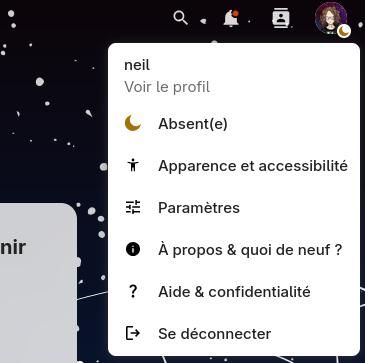
- On Nextcloud, in the top-right menu, click Settings :
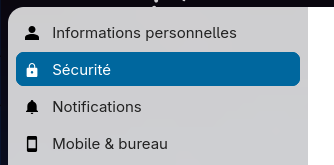
- Go to the Security tab:
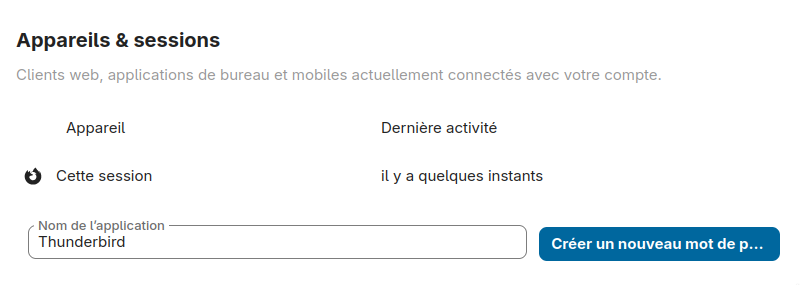
- At the very bottom of the page, in the Devices and sessions section, create a new device by giving it the name of your choice:
- Once the password has been created, you can enter it in your application. If you’re using a cell phone, you can display a QR code to automatically set the application.
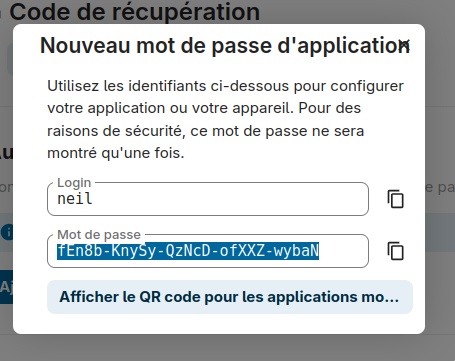
Your application is now connected to your account. You can revoke this connection by returning to the Devices and sessions section at any time.
Frequently asked questions
-
This is a folder that can be accessed by everyone in your organization. Its contents are synchronized among all members.
If a new person joins your organization, they will also have access to this folder.
Partages
-
Yes, but this requires contacting us and sending us the font file. The font must be published under a license that allows its reuse without conditions.
As this request requires manual action on our part, we would prefer that you send us all the fonts you would like to add at once.
-
No, the common folder is accessible to anyone who has an account on your Nextcloud. That said, it is possible to achieve the same result by another means.
To share files privately (only with certain people), you need to keep the private files outside the common folder, then go to the file or folder settings and add the names of the people you want to give access to.
This way, you can share files with read-only access for some people and read-write access for others, or allow access to the document only for certain accounts.
-
Yes, if you expressly request it. To do so, send us the logo and color of the navigation bar you would like, and we will configure it for you.
-
No, our offer does not allow you to add applications other than those provided by default (Files with collaborative document editing, Contacts, Calendar, Deck, Polls, Forms, and Tasks).
The reason is simple: we update the Nextcloud installations we host very regularly for security and performance reasons, and since most applications are developed by the community, there is no guarantee that they will be maintained in the long term. Some of them may become incompatible with future Nextcloud versions, which means we would have to disable it completely (and lose its data) in order to upgrade.
We believe that the applications we provide by default are mature and maintained enough to be used without fear of them being abandoned one day, because they are mature and development is active, or they are widely used, or developed by trusted teams such as the Nextcloud team, rather than by isolated volunteers (or a temporary intern in a company).
For other applications, we can review your request on a case-by-case basis, but we do not plan to add any applications. If you would like more customization in your installation, we recommend that you look into other hosting providers or install your own Nextcloud on your servers.
-
Yes, if your team does not use certain applications that we offer at all, you can request to disable them completely, which should improve the performance of your Nextcloud.
Personnalisation
-
Your data is stored on our dedicated server, which we rent from the German hosting provider Hetzner in Falkenstein.
After several weeks of non-use, files are automatically migrated to storage optimized for long-term preservation, managed by Hetzner and located in Helsinki, Finland.
Germany and Finland are renowned for their good policies on personal data and privacy (this is naturally part of our criteria), and Hetzner is a reputable hosting provider used by the Framasoft association for almost all of their servers.
-
The Nextclouds we host are installed in Docker containers, which are allocated between 500 MB and 1.5 GB of RAM depending on usage, not including the software infrastructure on which Nextcloud depends (S3 backend, PostgreSQL, Redis, Cron sidecar, Imaginary, reverse proxy, SSO authentication, and the Collabora Office server, which are shared between hosted instances). Our Nextclouds are hosted on a dedicated server rented from Hetzner, and have fairly substantial resources.
However, we expect your use of the Nextclouds we offer to be reasonable: we cannot allow you to constantly use 100% of the resources (CPU, RAM, bandwidth) of the Nextcloud space allocated to you.
Reaching these limits could occur if you send several GB of data to our server at once, in which case it is not constant usage, so this does not pose a problem for us.
However, if you notice slowdowns in some of your operations, please contact us and we will look into the situation. We may be able to temporarily increase the CPU/RAM resource limit for your Nextcloud to allow you to perform these operations smoothly.
-
We back up data every three hours on average to a remote server located in France. Backups are fully encrypted and then deduplicated to consume less disk space.
-
Storage capacity depends on the quota you have subscribed to. It is measured based on all files stored in your Nextcloud folders, across all accounts, not just the common folder. System files related to the Nextcloud installation itself are not counted.
If you suddenly find that you can no longer add files because you have reached your quota, check the following:
- Make sure that no user is storing large files in their personal folders, outside of the common folder;
- Make sure that your trash and that of other users is empty;
- Measure the space occupied by the common folder and move or delete any files that are too large.
You can also ask us to run a tool that will empty the trash cans of all accounts, measure the space occupied by the personal spaces of the accounts, and recalculate the quota.
Finally, you can also ask us to increase your quota, which will result in an update of the annual rate.
-
No, we only offer Collabora Office for collaborative document editing.
If this does not suit you, we recommend that you look into other hosting providers.
-
Unfortunately, this is not yet possible! However, you can sign up for a demo on the official Nextcloud website or watch videos on how to use the software.
You also have a legal withdrawal period of 14 days, which gives you time to test the software before deciding whether to migrate your files.
Infrastructure technique